-
'"Piracy these days on PC is probably less problematic than second-hand sales on the Xbox," declared lead Fable III combat designer Mike West.' Oh dear.
Nikon D-Series Intervalometer
17 May 2011
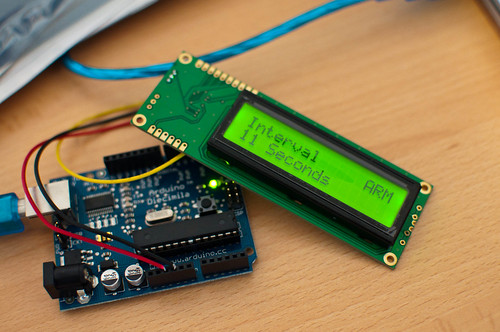
So, here’s a thing I’m making.
My Nikon D90 can be triggered by the cheap ML-L3 IR remote. It costs about £15. You point it at the camera, push the button, and it takes a picture.
This remote works with everything from the D90 down (so, towards the D3100/D40 end of the line).
What these cameras don’t have built in, however, is an intervalometer: a timer that will make the camera take a picture every n seconds or minutes. (The D300 and up (and, I believe, the new D7000) have a built-in intervalometer.)
I thought it might be interesting to build one. The project had a few criteria:
- It couldn’t be hard-wired to a computer. It had to be a stand-alone, battery-powered device
- It had to have a half-decent way of controlling it; ideally, not just stabbing at buttons.
- I wanted it to have a 16×2 LCD screen, mainly because I wanted to both design for that constraint, and work out how to control said screen
- Ideally, it wouldn’t require taking apart an ML-L3 remote to build.
Here’s where we are:
End-to-end: it works. Note that I said “making” earlier, though: it’s still not finished, because it’s not packaged. And whilst packaging is difficult, I think that’s what’ll make it feel finished for me: a black box I can easily take into the field.
You turn it on, rotate an encoder to set a time, and click the encoder in to arm it. Hold the encoder to disarm. The time varies from 1 second to 15 minutes – after 90 seconds, it increases in minute chunks. (15 minutes is the maximum time the D90 will stay on before powering down).
Most people ask me why it says “SAFE” and “ARM”. Well, it sounds a bit threatening, but I genuinely believed that OFF and ON were inaccurate, in that the device is “on” if the screen’s on. So I was just referring to the state of the timer. And something that fitted into four characters would work well with the layout of the screen I’d chosen.
How it works
There’s very little componentry here, but each section of the Intervalometer was a neat little thing to learn on its own.
First, the IR trigger itself. Nikon’s IR remote is relatively simple: a button, some circuitry, and an IR LED. Pushing the button doesn’t just light up the IR LED; it fires a very short “coded” burst of light, so that the only thing it’ll trigger will be a Nikon camera.
Fortunately for our needs, there’s an Arduino library called NikonIRControl, which emulates that coded burst in software – so a single command will send the appropriate burst to a digital output pin. That’s our IR trigger sorted, and all we’ve had to buy is an IR led. Which feels better – and cheaper – than just soldering two wires to a Nikon remote.
The screen is a 16×2 LCD, with a serial “backpack” pre-attached. That means I can just send serial data to it over a single wire, which again, keeps the number of wires from the Arduino down. I’m using the NewSoftSerial library to talk to it, which makes life easy.
The main controller is a quadrature rotary encoder with a push-switch in it. The switch is easily read, like any momentary push-switch on an Arduino. The encoder is a little trickier, because it’s encoded. In the end, I read it off an interrupt, using code from this page – and then smoothed it out a bit by making it only read every other click.
Finally, there’s just the case of the timer. Timers are a bit more fiddly than I’d have liked. You can’t just use delay, because that delays all code on the chip. I tried doing various things including counting milliseconds, but in the end, relied on the TimedAction library, which works well enough, and does a similar thing without my broken code.
Once each piece was in place and working, it was just a case of pulling it all together. The code – which is available on Github – is broken down into a series of files, pretty much one for each section of the project. I found this much easier to manage than the tyranny of One Big File.
For piecing the hardware together, I built a simple “shield” out of a piece of Veroboard. I got a lot of laughs when I said I was using veroboard, but it worked very well for me. With some headers soldered in, it was quite easy to line it up with the Arduino – making it easily changed, but also swappable. The usual electronics-debugging issues aside, this went fairly smoothly, and it only took a battery pack to give me a portable – if fragile – working intervalometer.
What’s next? Obviously, packaging it up – something sturdy and black, with an obvious power switch and that big knob. I was considering moving it to an Arduino Mini, for size reasons, but am not sure I can face more electronics debugging. Similarly, I’m not sure I’ll build a dedicated PCB or anything like that, yet.
But: if I can get this lot into a box, that’ll be good. Also: I should take some timelapses with it.
So whilst it’s not what I would call “finished”, it is an end-to-end demo – and that feels like good enough to share with the world.
(And, of course: if you’d like to use – or build on – my code, you’re more than welcome to.)
-
"It is – perhaps – at once a fascination with the raw possibility of a technology, and – a disinterest, in a way, of anything but the qualities of its output. Perhaps it happens when new technology becomes cheap and mundane enough to experiment with, and break – when it becomes semi-domesticated but still a little significantly-other. When it becomes a working material not a technology." This is all great stuff.
The Game Design of Everyday Things
11 May 2011
I’m writing a new column for the online component of excellent games magazine Kill Screen.
It’s called The Game Design of Everyday Things, and is about the ways that the ways we interact with objects, spaces, and activities in the everyday world can inform the way we design games.
Which is, you know, a big topic, but one that pretty much encompasses lots of my interests and work to date. I think it’s going to cover some nice ideas in the coming weeks and months.
I’ve started by looking at that fundamental of electronic games: buttons.
Every morning, I push the STOP button on the handrail of a number 63 bus. It tells the driver I want to get off at the next stop.
I’m very fond of the button. It immediately radiates robustness: chunky yellow plastic on the red handrail. The command, STOP, is written in white capitals on red. There’s a depression to place my thumb into, with the raised pips of a Braille letter “S” to emphasize its intent for the partially sighted. When pushed, the button gives a quarter-inch of travel before stopping, with no trace of springiness; a dull mechanical ting rings out, and the driver pulls over at the next stop.
It’s immediately clear what to do with this button, and what the outcome of pushing it will be. It makes its usage and intent obvious.
This is a good button.
Quiet
11 May 2011
Been quiet around here lately.
Sorry about that; blame new jobs, bank holidays, product launches and the bit where I bust my arm up somewhat badly.
All soon-to-be rectified with a steady trickle of a few underwhelming pieces of content, though. Onwards!
-
"Patrick Stump survived The Scene, then." I went to see Patrick Stump play some music. Then I reviewed it for Londonist.
-
Nice little collection of indie pen-and-paper RPGs; Dread sounds a lot of fun, and yet another reminder how much I need to get Fiasco.
-
"Occasionally, as we discuss designs and possibilities, Nick gets a look in his eyes, like he’s going to have punch physics in the brain. Physics looks back at him like a spoilt four year old teasing a doberman. It’s the best stand off you’ve ever seen." I have seen this look.
-
“I guess you could ask people to make recommendations on LinkedIn,” said Scott. Scott and I both work in information technology. “ 'Working with Cynthia was an amazing experience as she always made deadlines and was incredibly prepared for meetings and she is as good as her word when it comes to not dropping a deuce on your floor.'” Marvellous writing, as ever, from Paul Ford.
-
"I’d really like more week-long exercises in fiction delivered to me via Twitter. The problem with other accounts for fictional characters – including, say, The West Wing’s Joshua Lyman and Donna Moss – is that they’re continuous, shapeless roleplay. I want a planned narrative that ends."
-
"It has been interesting to watch the rise of the subsequent discourse on gamification, because to me, the focus on "achievements" and such misses the real power of games: they teach us dynamic system models. The instruments we build at Bloom will each provide a different "physics of information," or game-like rule set that maps the variables from the data the user is viewing (how many followers does my friend have) into a set of rules that govern the behavior and presentation of the data (how big is the dot that represents that friend). Once users learn how these rules work, they can perform the system like they might perform a video game, zooming through structures, using tools, and interacting with the environment. Play is the way humans learn how new environments work. We'll let people play in countless environments built by their own network data and resources." Dingdingding!
-
Oh, that looks marvellous.
-
"Games of every hue are mental anchors – lumps of code that occurred at regular intervals in your life that you can hang your memories around. The reason retro gaming has such an appeal is because it provides a direct and unchanging channel to your past self – someone probably very different to the person who struts around with your body hanging off him today. For many (and overall, of course, for me) the skies weren’t only bluer, the grass wasn’t only greener and the world wasn’t only simpler in games of yesterday – so too our memories of our lives while we played them." Gosh, coverdiscs. So many memories.